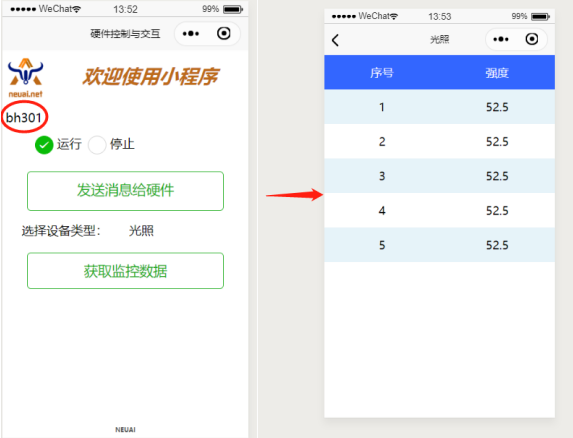
小程序实现与设备的交互
开发环境搭建
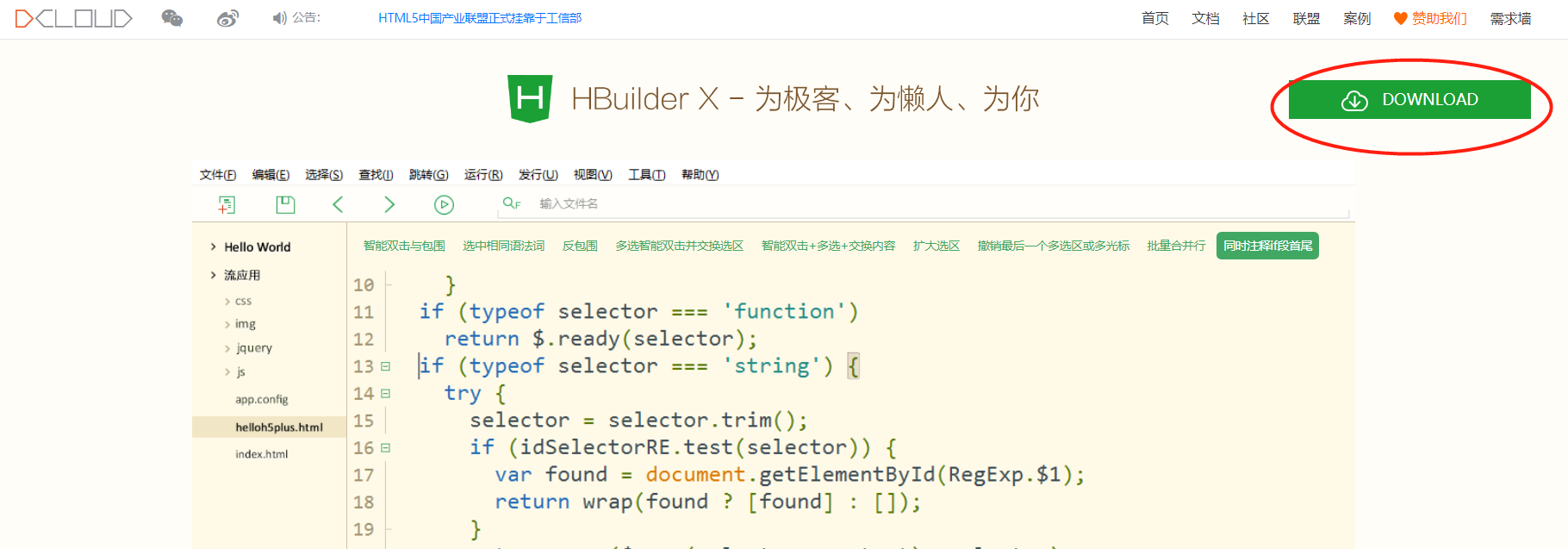
- 通过 HBuilderX 可视化界面。开始之前,开发者需先下载安装如下工具:HBuilderX。
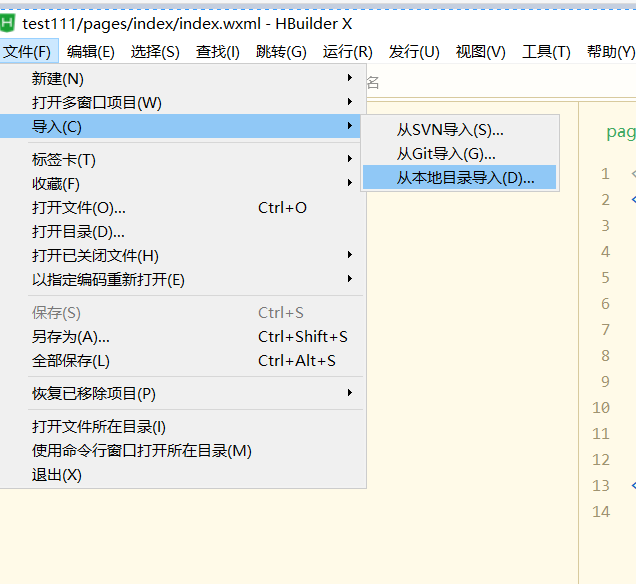
- 创建项目,在点击工具栏里的文件 -> 导入 -> 本地目录:
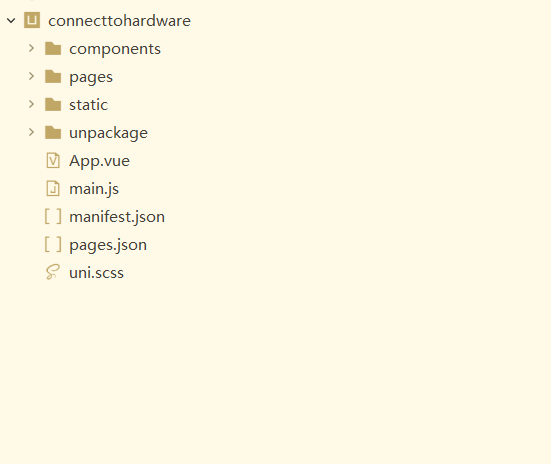
选择工程名称“connecttohardware”,工程导入后会在左侧的工程栏中显示。
- 运行小程序
在运行开发好的小程序前需要在HBuilderX中配制微信开发者工具路径以及小程序id如下图,
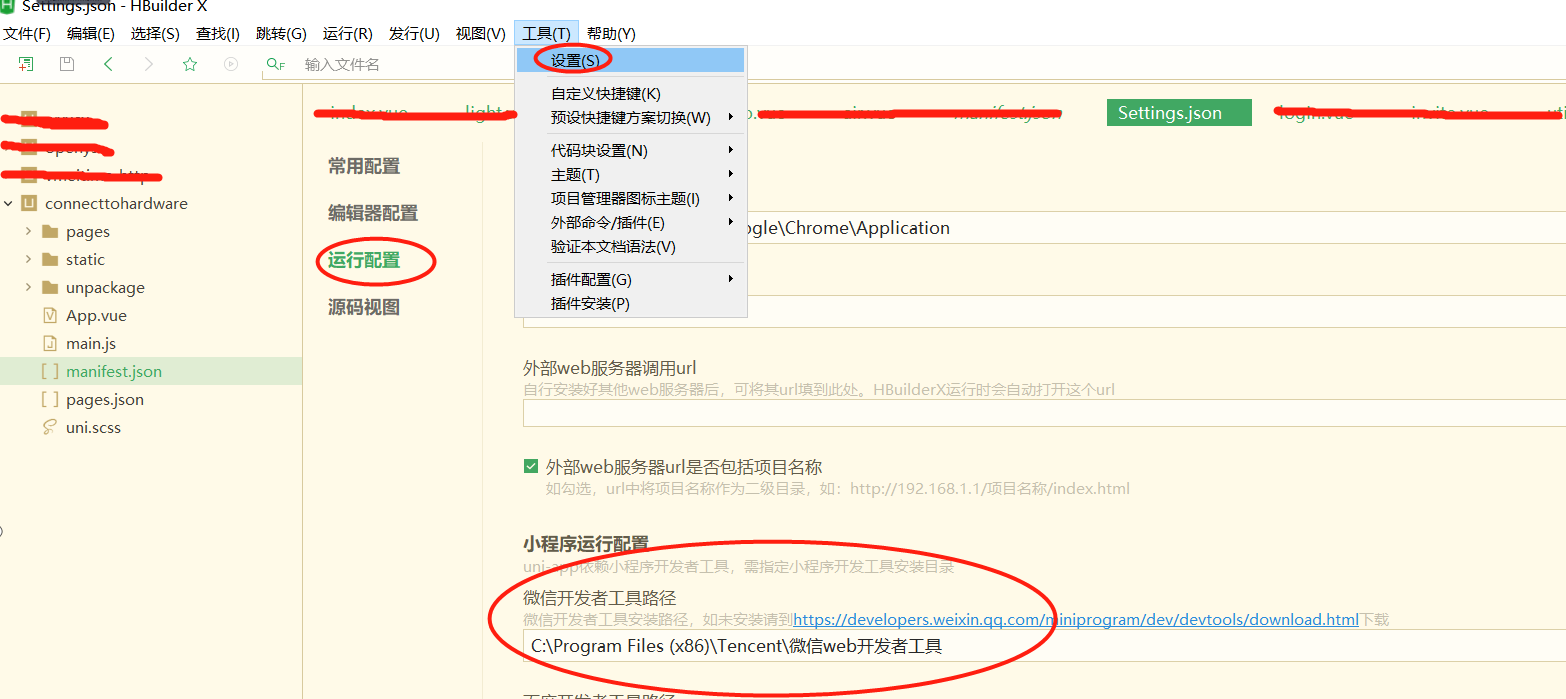
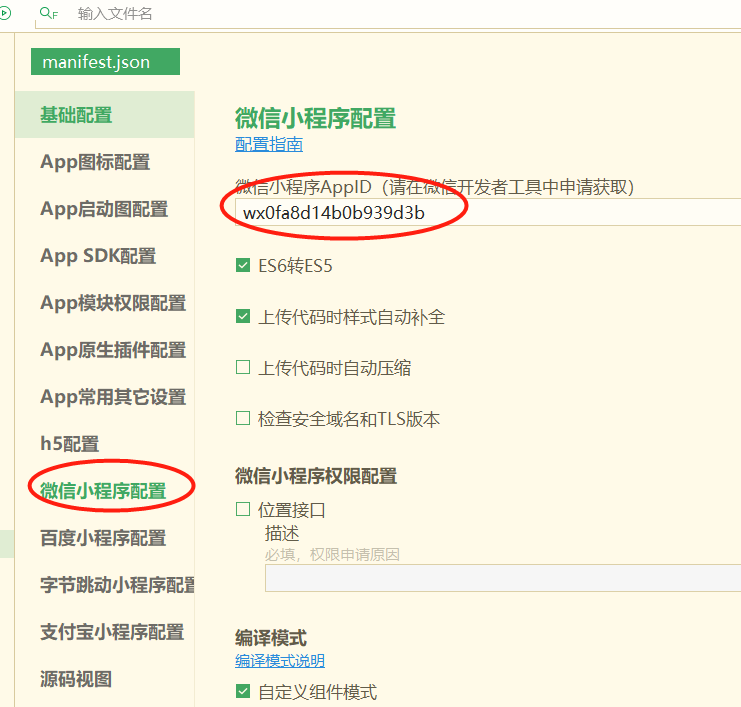
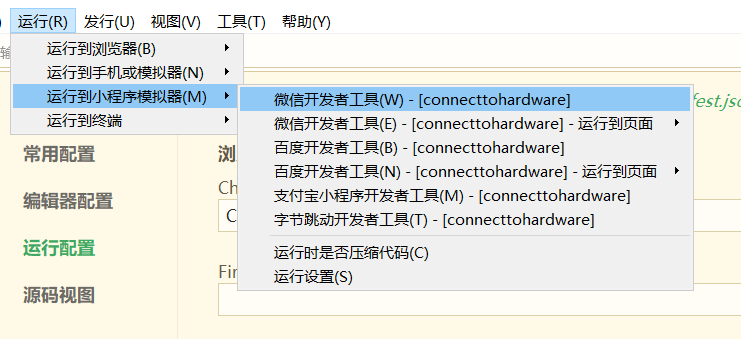
在微信开发者工具里运行小程序:进入开发的项目,点击工具栏的运行 -> 运行到小程序模拟器 -> 微信开发者工具,即可在微信开发者工具里面体验uni-app。
- 发布为小程序
1,申请微信小程序AppID,参考:微信教程:。 2,在HBuilderX中顶部菜单依次点击 “发行” => “小程序-微信”,输入小程序名称和appid点击发行即可在 unpackage/dist/build/mp-weixin 生成微信小程序项目代码。
3,在微信开小程序发者工具中,导入生成的微信小程序项目,测试项目代码运行正常后,点击“上传”按钮,之后按照 “提交审核” => “发布” 小程序标准流程,逐步操作即可,详细查看:微信教程:。
操作流程
代码实现
- 语法基础:
- 程序是基于uni-app开发,uni-app 是一个使用 Vue.js 开发跨平台应用的前端框架,开发者编写一套代码,可编译到iOS、Android、H5、小程序等多个平台。
- VUE参考:。
- uni-app组件参考:。
- uni-app 接口参考:。
- 程序功能:
- 输入设备id号(Python程序中设置),控制设备的运行和停止(skids板子效果是led灯的亮灭,步进电机的运行 )。
- 显示最近空气温湿度数据。
- 显示最近光照数据。
- 显示最近血氧数据。
- 显示最近Skids操作数据。
- 程序结构
┌─components            uni-app组件目录
│
├─pages                 业务页面文件存放的目录
│  ├─index
│  │  └─index.vue       index页面
│  │  └─air.vue         空气温湿度查询页面
│  └─ └─light.vue       光照查询页面
│     └─spo.vue         血氧查询页面
│     └─skids.vue       skids操作查询页面
│
├─static                存放应用引用静态资源(如图片、视频等)的地方,注意:静态资源只能存放于此
├─main.js               Vue初始化入口文件
├─App.vue               应用配置,用来配置App全局样式以及监听 应用生命周期
├─manifest.json         配置应用名称、appid、logo、版本等打包信息
└─pages.json            配置页面路由、导航条、选项卡等页面类信息
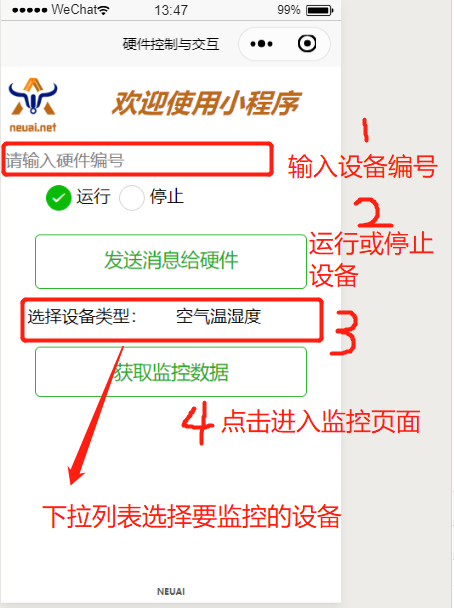
- 首页
- 文本框用来输入设备id。
- RadioButton用来选择运行和停止命令。
- 列表选择框用来选择要获取的设备类型。
- 两个按钮一个用来发送控制命令,一个用来获取设备数据。
布局代码
<template>
        <view class="page">
                <view style="width:100%;height:150rpx;display:flex;">
                        <view style="width:20%;">
                                <image src="../../static/niuuilogo.png" mode='aspectFit' class="height-width-max" />
                        </view>
                        <view style="width:83%;display:flex ; justify-content:center;align-items:center;">
                                <text style="font-weight:900;font-size:60rpx;color:#BD6A18;font-style:italic">欢迎使用小程序</text>
                        </view>
                </view>
                <view class="uni-list">
                        <view class="uni-list-cell" style="padding-top: 30upx; padding-left: 10upx;">
                                <input class="uni-input" focus placeholder="请输入硬件编号" @input="getCode" />
                        </view>
                        <view style="width:100%;height:50rpx;display:flex; padding-top: 30upx;">

                                <view class="uni-list">
                                        <radio-group @change="radioChange" style="display:flex; padding-left:80rpx;">
                                                <label class="uni-list-cell uni-list-cell-pd" style="display: flex; padding-left:20rpx" v-for="(item, index) in items" :key="item.value">
                                                        <view>
                                                                <radio :value="item.value" :checked="index === current" />
                                                        </view>
                                                        <view>{{item.name}}</view>
                                                </label>
                                        </radio-group>
                                </view>

                        </view>
                        <view style="align-items:center;justify-content:space-around;display:flex;flex-direction: column;;width:100%;height:440rpx;display:flex;">
                                <view style="width:80%;height:150rpx; ">
                                        <button @click="sendMessageToDevice" style="height:120upx;margin-top: 40upx;" round plain size="large" type="primary">
                                                发送消息给硬件
                                        </button>
                                </view>
                                <view class="uni-list-cell" style="display: flex;width:100%">
                                        <view class="uni-list-cell-left" style="width:90%;padding-left: 60upx;">
                                                选择设备类型:
                                        </view>

                                        <view class="uni-list-cell-db" style="display:flex; width:100%">
                                                <picker style="width:90%;" @change="bindPickerChange" :value="deviceIndex" :range="deviceArray" range-key="name">
                                                        <view class="uni-input" style="width: 100%;height: 30%;">{{deviceArray[deviceIndex].name}}</view>
                                                </picker>
                                        </view>
                                </view>

                                <view style="width:80%;height:110rpx;">
                                        <button @click="navigateToNewPage" round plain size="large" type="warning">获取监控数据</button>
                                </view>
                        </view>

                        <view style="width:40%;height:30rpx;position:fixed;bottom:10rpx; margin:auto;left:0;right:0;">
                                <view style="display:flex;width:100%;justify-content:center;align-items:center;">
                                        <text style="font-weight:900;font-size:20rpx;color:#515352">NEUAI</text>
                                </view>

                        </view>
                </view>
        </view>
</template>
- 逻辑控制代码。
<script>
        export default {
                data() {
                        return {
                                items: [{//radio button 数据
                                                value: 'open',
                                                name: '运行'
                                        },
                                        {
                                                value: 'close',
                                                name: '停止',
                                                checked: 'true'
                                        },
                                ],
                                current: 0,//记录当前radio button 的选项
                                deviceID: "sk1", //tb1,sk1,ox1
                                deviceArray: [{"name":"空气温湿度"}, {"name":"光照"}, {"name":"血氧"}, {"name":"SKIDS"}],
                                deviceIndex: 0,
                        }
                },
                onLoad() {

                },
                methods: {
                        radioChange(evt) {
                                var _this = this;
                                for (let i = 0; i < _this.items.length; i++) {
                                        if (_this.items[i].value === evt.target.value) {
                                                _this.current = i;
                                                break;
                                        }
                                }
                        },
                        sendMessageToDevice() {
                                uni.showLoading({
                                        title: '发送数据中...'
                                });
                                var _this = this;
                                var key = _this.deviceID;
                                var dataJson = {
                                        "head": {
                                                "uniqueId": key,
                                                "env": "edu_ruidao",
                                                "action": "sendControlData"
                                        },
                                        "body": {
                                                "operation": _this.items[_this.current].value
                                        }
                                };
                                console.log(dataJson);
                                uni.request({
                                        url: _this.app.alobalData.baseUrl + '/app/monitor/sendControlData',
                                        data: dataJson,
                                        method: 'POST',
                                        header: {
                                                'content-type': 'application/json'
                                        },
                                        success: (res) => {
                                                //openId、或SessionKdy存储//隐藏loading
                                                uni.hideLoading();
                                                if (res.data.head.status == "200") {

                                                        console.log(res.data)

                                                } else if (res.data.head.exception == "300") {
                                                        if (res.data.head.exception == "fail") {
                                                                uni.showModal({
                                                                        title: '注意',
                                                                        content: '请联系管理员'
                                                                })
                                                        } else if (res.data.head.exception == "offline") {
                                                                uni.showModal({
                                                                        title: '注意',
                                                                        content: '此设备为离线状态'
                                                                })
                                                        } else {

                                                        }
                                                }

                                        },
                                        fail: (res) => {
                                                uni.hideLoading();
                                                console.log(res);
                                                _this.isCanUselocked = true;
                                        }
                                });
                        },
                        getCode(event) {
                                var _this = this;
                                _this.deviceID = event.target.value;
                                console.log(_this.deviceID);
                        },
                        //跳转新页面
                        navigateToNewPage() {
                                var _this = this;
                                var index = _this.deviceIndex;

                                if (index == 0) { //跳转到空气数据页面
                                        uni.navigateTo({
                                                url: '../index/air?deviceID=' + _this.deviceID,
                                        })
                                } else if (index == 1) { //跳转到光照页面
                                        uni.navigateTo({
                                                url: '../index/light?deviceID=' + _this.deviceID,
                                        })
                                } else if (index == 2) { //跳转到血氧页面
                                        uni.navigateTo({
                                                url: '../index/spo?deviceID=' + _this.deviceID,
                                        })
                                } else {
                                        uni.navigateTo({
                                                url: '../index/skids?deviceID=' + _this.deviceID,
                                        })
                                }
                        },
                        bindPickerChange(e) {
                                console.log('picker发送选择改变,携带值为:' + e.target.value)
                                this.deviceIndex = e.target.value
                        },
                }
        }
</script>
- 布局css代码
<style>
        .container {
                display: flex;
                flex-direction: column;
                align-items: center;
                box-sizing: border-box;
                font: 16px/1 Tahoma, Helvetica, Arial, '宋体', sans-serif;
        }
        .height-width-max {
                height: 100%;
                width: 100%;
        }
        .search-cus {
                width: 100%;
                background: #ffffff !important;
        }
        .van-search__field {
                border: 1px outset #d0d0d0;
        }
        #message {
                color: #FF6600;
        }
        .swiperClass {
                margin: 0;
                margin-top: 10px;
                width: 100%;
                height: 90%;
                display: flex;
                justify-content: center;
                align-items: center;
        }

        .swiper-item {
                display: flex;
                justify-content: center;
                align-items: center;
        }

        .slide-image {


                width: 99%;
                height: 90%;
                border-radius: 10px;
                position: relative;

        }

        image.active {
                transform: none;
                transition: all 0.2s ease-in 0s;
                box-shadow: 2px 2px 2px #999999;
        }

        image.quiet {
                transform: scale(0.8333333);
                transition: all 0.2s ease-in 0s;
        }

        .radio-group {
                padding: 0 17px;
        }

        .radio {
                margin-bottom: 10px;
        }
</style>
- 血氧数据显示页面
<template>
<view>
<view class="table">
<view class="tr bg-w">
<view class="th">序号</view>
<view class="th">脉搏</view>
<view class="th ">血氧</view>
</view>
<block v-for="(item,index) in listData" :key="index">
<view class="tr bg-g" v-if="index % 2 == 0">
<view class="td">{{item.id}}</view>
<view class="td">{{item.pulseRate}}</view>
<view class="td">{{item.bloodOxygen}}</view>
</view>
<view class="tr" v-else>
<view class="td">{{item.id}}</view>
<view class="td">{{item.pulseRate}}</view>
<view class="td">{{item.bloodOxygen}}</view>
</view>
</block>
</view>
</view>
</template>
<script>
export default {
data() {
return {
deviceID: '',//需要访问的设备id
listData: [],//实际数据
timer: null,//记录当前启动的timer
loaded: 0,//判断是否加载完成
}
},
onLoad(infor) {
var _this = this;
_this.deviceID = infor.deviceID;//保存主页面传过来的设备id
console.log("deviceID:" + _this.deviceID);
_this.handleGetMonitorData();
},
onUnload() {
var _this = this;
clearTimeout(_this.timer);//页面离开时清空最后一个timer
console.log("onUnload");
},
methods: {
test() {
var _this = this;
for (let i = 0; i < 10; i++) {
_this.listData = (_this.listData).concat([{
id: i,
pulseRate: i,
bloodOxygen: i
}]);
}
},
handleGetMonitorData() {//3秒后请求数据,并再次调用请求
uni.showLoading({
title: '加载数据中...'
});
var _this = this;
clearTimeout(_this.timer);
var timerTem = setTimeout(function() {
if (_this.loaded == 1) {//如果页面已经加载完成3秒后再次请求数据
_this.getMonitorData();
_this.handleGetMonitorData();
_this.loaded = 0;
}
}, 3 * 1000);
_this.timer = timerTem;
console.log("handleGetMonitorData");
},
getMonitorData() {//请求设备数据
var _this = this;
var dataJson = {
"head": {
"id": "getMonitorData",
"uniqueId": _this.deviceID,
"env": "edu_ruidao",
"token": ""
},
"body": {
"action": "getMonitorData",
"type": "7"//血氧类型值
}
}
uni.request({
url: _this.app.alobalData.baseUrl + '/app/monitor/getMonitorData', //"https://easy-mock.com/mock/5d0738497488d96c0589051b/example/app/monitor/getMonitorData", //
data: dataJson,
method: 'POST',
header: {
'content-type': 'application/json'
},
success: (res) => {
uni.hideLoading();
console.log(res);
var _this = this;
_this.loaded = 1;
if (res.data.head.status == "200") {//数据请求成功
console.log("request suc 200");
var body = res.data.body;
var deviceDatas = body.list;
_this.listData = [];
if (deviceDatas.length == 0) {
uni.showToast({
title: '无数据',
icon: 'none'
});
return;
}
for (let i = 0; i < deviceDatas.length; i++) {
_this.listData = _this.listData.concat([{
id: i + 1,
pulseRate: deviceDatas[i].pulseRate,
bloodOxygen: deviceDatas[i].bloodOxygen
}]);
}
} else if (res.data.head.exception == "300") {//数据请求成功但是服务器错误
console.log("request exception 300");
uni.hideLoading();
if (res.data.head.exception == "fail") {
uni.showToast({
title: '请联系管理员',
icon: 'none'
});
} else if (res.data.head.exception == "offline") {
uni.showToast({
title: '此设备为离线状态',
icon: 'none'
});
} else {
}
}
},
fail: (res) => {//数据请求失败
var _this = this;
_this.loaded = 1;
uni.hideLoading();
console.log("request fail");
}
});
}
}
}
</script>
<style>
.table {
border: 0px solid darkgray;
}
.tr {
display: flex;
width: 100%;
justify-content: center;
height: 3rem;
align-items: center;
}
.td {
width: 40%;
justify-content: center;
text-align: center;
}
.bg-w {
background: snow;
}
.bg-g {
background: #E6F3F9;
}
.th {
width: 40%;
justify-content: center;
background: #3366FF;
color: #fff;
display: flex;
height: 3rem;
align-items: center;
}
</style>
其它页面代码与此类似。
效果展示