8. 贪吃蛇游戏制作
8.1. 基本原理
可交互的动画片
跟电影的原理类似,游戏中的动画效果,本质上是快速的在屏幕上绘制图像,一般在电脑上 每秒绘制 60 次,就能够达到非常连续高品质的动画效果。
程序基本流程
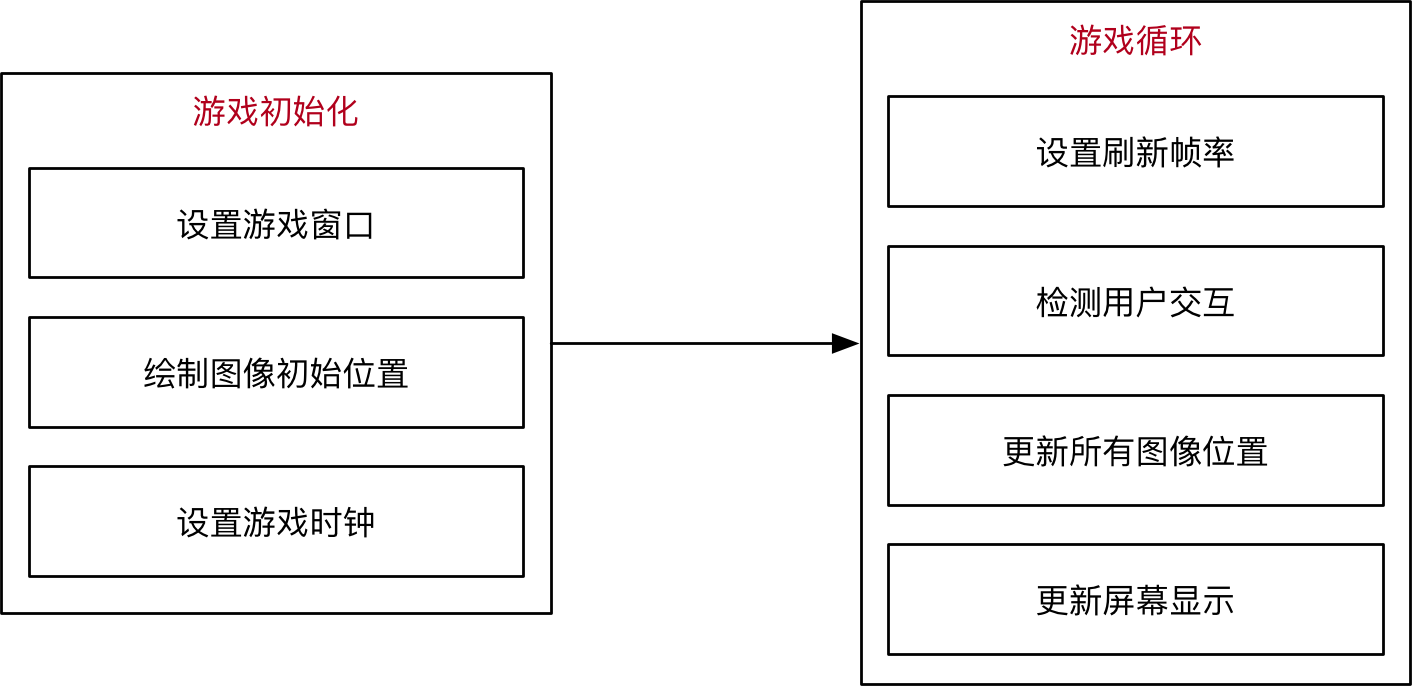
- 游戏循环的作用
- 保证游戏不会直接退出
- 变化图像位置 — 动画效果
- 每隔一段时间移动或更新一下所有图像的位置
- 检测用户交互 — 按键、鼠标等
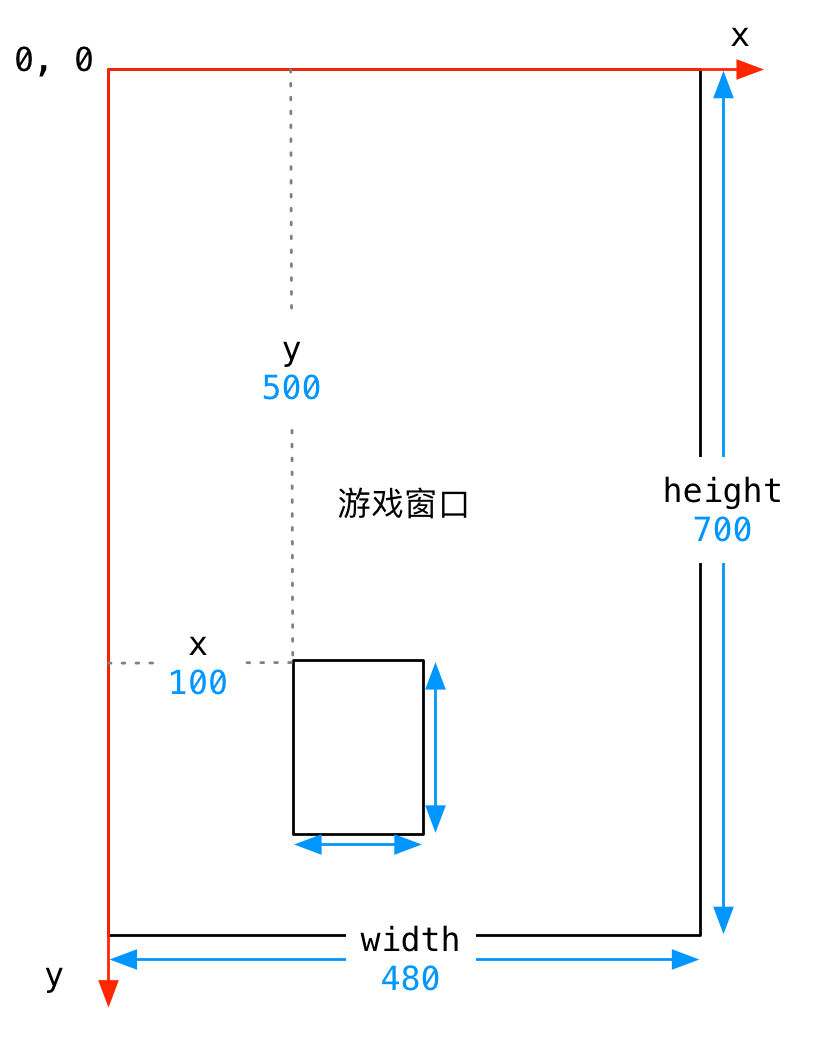
- 游戏中的坐标系描述
- 原点在左上角 (0, 0)
- x 轴水平方向向右,逐渐增加
- y 轴垂直方向向下,逐渐增加
- 在游戏中,所有可见的元素都是以矩形区域来描述位置的
- 要描述一个矩形区域有四个要素:(x, y) (width, height)
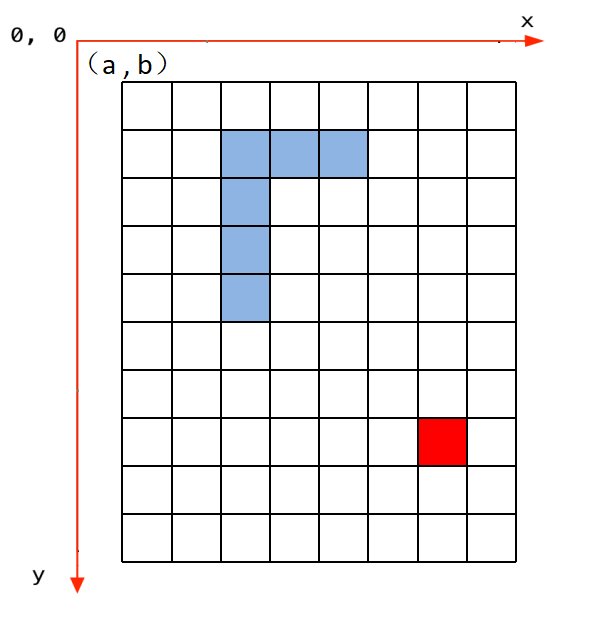
- 贪吃蛇的网格坐标
- 将屏幕分成若干10*10的网格
- 对指定网格填充颜色形成蛇的身体
- 对指定网格填充颜色形成食物
- 网格左上角坐标和屏幕坐标的变换
- x = 网格横坐标 * 10 + a
- y = 网格纵坐标 * 10 + b
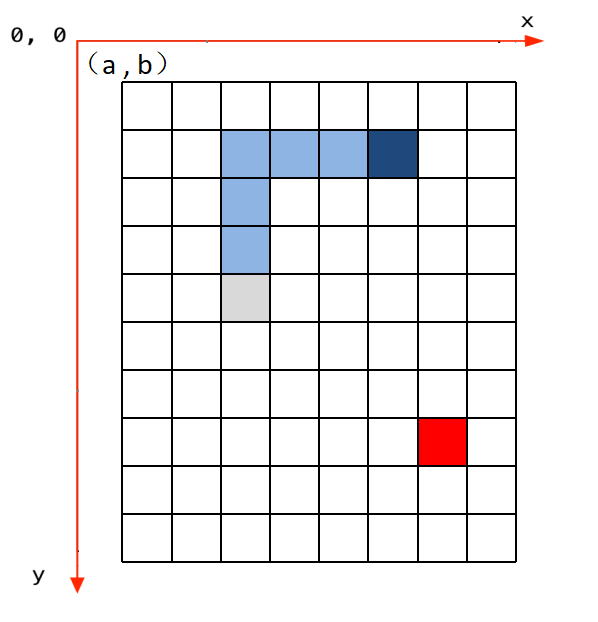
- 贪吃蛇的移动
- 移动方向填充身体颜色
- 蛇尾部填充背景颜色
- 不能向自己的反方向前进
8.2. 代码分析
- Grid网格类
class Grid(object):
    def __init__(self, master=None, x=10, y=10, w=222, h=303):
        self.x = x
        self.y = y
        self.w = w
        self.h = h
        self.width = w // 10 - 1
        self.height = h // 10 - 1
        self.bg = 0x000000
        print(self.width, self.height)

        # 画背景
        for i in range(320):
            screen.drawline(0, i, 239, i, 1, self.bg)

        # 画边界
        screen.drawline(x, y, x + w - 1, y, 1, 0xFFFFFF)
        screen.drawline(x + w - 1, y, x + w - 1, y + h, 1, 0xFFFFFF)
        screen.drawline(x, y + h, x + w - 1, y + h, 1, 0xFFFFFF)
        screen.drawline(x, y, x, y + h, 1, 0xFFFFFF)

    def draw(self, pos, color):
        x = pos[0] * 10 + self.x + 1
        y = pos[1] * 10 + self.y + 1
        for i in range(10):
            screen.drawline(x, y + i, x + 10 - 1, y + i, 1, color)
- 食物类
class Food(object):
    def __init__(self, grid, color=0xFF0000):
        self.grid = grid
        self.color = color
        self.set_pos()
        self.type = 1

    def set_pos(self):
        x = randint(0, self.grid.width - 1)
        y = randint(0, self.grid.height - 1)
        self.pos = (x, y)

    def display(self):
        self.grid.draw(self.pos, self.color)
- 蛇类
class Snake(object):
    def __init__(self, grid, color=0xFFFFFF):
        self.grid = grid
        self.color = color
        self.body = [(5, 5), (5, 6), (5, 7)]
        self.direction = "Up"
        for i in self.body:
            self.grid.draw(i, self.color)

    # 这个方法用于游戏重新开始时初始化贪吃蛇的位置
    def initial(self):
        while not len(self.body) == 0:
            pop = self.body.pop()
            self.grid.draw(pop, self.grid.bg)
        self.body = [(8, 11), (8, 12), (8, 13)]
        self.direction = "Up"
        self.color = 0xFFFFFF
        for i in self.body:
            self.grid.draw(i, self.color)

    # 蛇像一个指定点移动
    def move(self, new):
        self.body.insert(0, new)
        pop = self.body.pop()
        self.grid.draw(pop, self.grid.bg)
        self.grid.draw(new, self.color)

    # 蛇像一个指定点移动,并增加长度
    def add(self, new):
        self.body.insert(0, new)
        self.grid.draw(new, self.color)

    # 蛇吃到了特殊食物1,剪短自身的长度
    def cut_down(self, new):
        self.body.insert(0, new)
        self.grid.draw(new, self.color)
        for i in range(0, 3):
            pop = self.body.pop()
            self.grid.draw(pop, self.grid.bg)

    # 蛇吃到了特殊食物2,回到最初长度
    def init(self, new):
        self.body.insert(0, new)
        self.grid.draw(new, self.color)
        while len(self.body) > 3:
            pop = self.body.pop()
            self.grid.draw(pop, self.grid.bg)

    # 蛇吃到了特殊食物3,改变了自身的颜色,纯属好玩
    def change(self, new, color):
        self.color = color
        self.body.insert(0, new)
        for item in self.body:
            self.grid.draw(item, self.color)
- 游戏类
class SnakeGame():
    def __init__(self):
        screen.clear();
        self.grid = Grid()
        self.snake = Snake(self.grid)
        self.food = Food(self.grid)
        self.gameover = False
        self.score = 0
        self.status = ['run', 'stop']
        self.speed = 300
        self.display_food()

    # type1:普通食物  type2:减少2  type3:大乐透,回到最初状态  type4:吃了会变色
    def display_food(self):
        self.food.color = 0xFF0000
        self.food.type = 1
        if randint(0, 40) == 5:
            self.food.color = 0x00FF00
            self.food.type = 3
            while (self.food.pos in self.snake.body):
                self.food.set_pos()
            self.food.display()
        elif randint(0, 4) == 2:
            self.food.color = 0x0000FF
            self.food.type = 4
            while (self.food.pos in self.snake.body):
                self.food.set_pos()
            self.food.display()
        elif len(self.snake.body) > 10 and randint(0, 16) == 5:
            self.food.color = 0xFFFFFF
            self.food.type = 2
            while (self.food.pos in self.snake.body):
                self.food.set_pos()
            self.food.display()
        else:
            while (self.food.pos in self.snake.body):
                self.food.set_pos()
            self.food.display()
        print(self.food.type)

    # 这个方法用于游戏重新开始时初始化游戏
    def initial(self):
        self.gameover = False
        self.score = 0
        # self.m.set("Score:"+str(self.score))
        self.snake.initial()

    def run(self):
        while True:
            i = 0
            j = -1
            for k in keys:
                if k.value() == 0:
                    if i != j:
                        print("i=", i)
                        print("j=", j)
                        j = i
                        self.key_release(i)

                i = i + 1
                if i > 3:
                    i = 0
            # 首先判断游戏是否暂停
            if not self.status[0] == 'stop':
                if self.gameover == True:
                    self.initial()
                else:
                    # 判断游戏是否结束
                    self.move()
            time.sleep_ms(125)

    # self.after(self.speed, self.run)
    def move(self, color=0xFFFFFF):
        # 计算蛇下一次移动的点
        head = self.snake.body[0]
        # print(self.snake.direction)
        if self.snake.direction == 'Up':
            if head[1] - 1 < 0:
                new = (head[0], 29)
            else:
                new = (head[0], head[1] - 1)
        elif self.snake.direction == 'Down':
            new = (head[0], (head[1] + 1) % 29)
        elif self.snake.direction == 'Left':
            if head[0] - 1 < 0:
                new = (21, head[1])
            else:
                new = (head[0] - 1, head[1])
        else:
            new = ((head[0] + 1) % 21, head[1])
        # 撞到自己,设置游戏结束的标志位,等待下一循环
        if new in self.snake.body:
            self.gameover = True
        # 吃到食物
        elif new == self.food.pos:
            print(self.food.type)
            if self.food.type == 1:
                self.snake.add(new)
            elif self.food.type == 2:
                self.snake.cut_down(new)
            elif self.food.type == 4:
                self.snake.change(new, 0x0000FF)
            else:
                self.snake.init(new)
            self.display_food()

        # 什么都没撞到,继续前进
        else:
            self.snake.move(new)

    def key_release(self, key):
        keymatch = ["Down", "Left", "Up", "Right"]
        key_dict = {"Up": "Down", "Down": "Up", "Left": "Right", "Right": "Left"}
        print(keymatch[key])
        # 蛇不可以像自己的反方向走
        if keymatch[key] in key_dict and not keymatch[key] == key_dict[self.snake.direction]:
            self.snake.direction = keymatch[key]
            self.move()